
Support for processing received MMS messages is slightly more complex than received SMS messages, because the content of MMS messages is more complex, and the network configuration information to receive MMS messages is also considerably more complex. To enable received MMS messages to be processed, on the “2-Way” configuration dialog, both “Process Received SMS Messages” and “Process Received MMS Messages” must be checked.
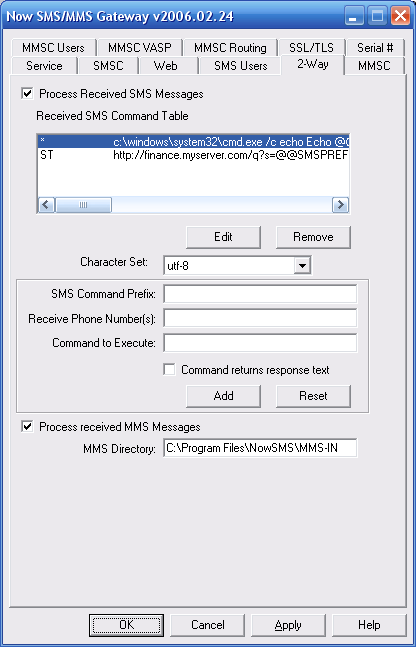
The Now SMS & MMS Gateway can receive MMS messages via two different types of connections.
- MMS messages can be received via a direct connection to an operator MMSC using one of the supported protocols, including MM7, MM4 or EAIF. When any of these protocols are used, the operator MMSC will automatically connect to your Now SMS/MMS Gateway to deliver messages. For more information on this type of connection, please refer to Connecting to an Operator MMSC – Receiving MMS Messages.
- MMS messages can be received using a combination of SMS and WAP technologies. When an MMS message is sent to a mobile phone, the mobile phone first receives an MMS notification message over SMS. The Now SMS & MMS Gateway can receive this MMS notification over SMS, and then retrieve the content of the MMS message over WAP or the internet, just as it would be received by a mobile device. For more information on this type of connection, please refer to Connecting to an Operator MMSC – Using a GPRS Modem.
There are different options for the processing of received MMS messages. Because MMS messages typically contain multiple objects, as opposed to the simple text string of an SMS message, they are routed to applications via different interfaces.
The routing choices for received MMS messages is configured separately for each potential connection through which the gateway can receive MMS messages.
When the gateway is receiving MMS messages via an operator MMSC, an account is defined in the “MMSC VASP” configuration dialog, and the option for how to route MMS messages received over this connection is defined as part of the account definition.
When the gateway is receiving MMS messages via an SMSC or GSM modem connection, the “Properties” dialog for the SMSC configuration will include an “MMS Settings” dialog.
The choices for how received MMS messages are processed are:
“Receive to MMS-IN Directory” – In this case, the MMS message is parsed into text format, and individual components of the message are extracted into separate files. A “.hdr” file is written to the MMS-IN directory which contains a text version of the MMS header. This header file includes “X-NowMMS-Content-Location:” headers that point to the different file components that are included in the MMS message (text, images, etc.). These additional file components are stored in a subdirectory, and the location specified in the header is relative to the MMS-IN directory. The format of these “.hdr” files is consistent with the format used by the MMSCOMP utility, which is described in the section titled Creating MMS Message Files – MMSCOMP.
“Route via MM7” – MM7 is an XML/SOAP interface that is defined by the 3GPP as a format for applications to send/receive MMS messages. When this type of routing is defined for received MMS messages, NowSMS reformats the MMS message into MM7 format, and performs an HTTP POST of the content to the specified MM7 connection. You must first define an MM7 connection on the “MMSC Routing” configuration dialog before you will be able to select this option for routing a received MMS message.
In addition to supporting an HTTP POST in MM7 format, NowSMS supports an HTTP POST using “HTTP File Upload”, where the content of the MMS message can be processed by a PHP script. This type of script is described in more detail in the section Receiving MMS Messages with a PHP Script.
“Forward to E-Mail Address” – The MMS message is converted into an e-mail message (with components of the MMS message converted to attachments) and sent to a specified e-mail address.
NowSMS NextGen for Linux

Purchase NowSMS